
Which version are you in? Look at the menu on the left. If you see Loans with a New label, follow the first set of steps. If your leases sit inside your assets, follow the second set.
In Loans (new)
In Loans, there is one import for loans: Import Loans. You will find it under Loans > Add Loans > File Import.
During the import, the Import Options step asks how your payment schedule is set out:
- Regular payments: for loans with the same payment each period, with an optional first payment (for example, a deposit) and an optional last payment (for example, a balloon payment). This replaces the Asset Financed Import (regular payments).
- Separate worksheet: for loans with irregular payments, where the payment schedule is set out on its own worksheet. This replaces the Custom Lease Import.
For Separate worksheet, add a column to your loans sheet with the name of the worksheet that holds each loan's payment schedule. On that worksheet, list the payment dates and amounts. You can enter each payment as one amount, or as principal and interest separately.
Right of use leases are not part of Loans yet. Keep them on the current version, in their own register, and use the Right-of-Use Import described below.
For how to import your loans and link them to the assets they financed, see Add your assets, then import your loans.
Loans is new and we are still adding to it. Bulk actions for loans are not available yet. See What is coming next in Loans.
In the current version
AssetAccountant offers three methods of uploading leases when the relevant upload button is clicked:
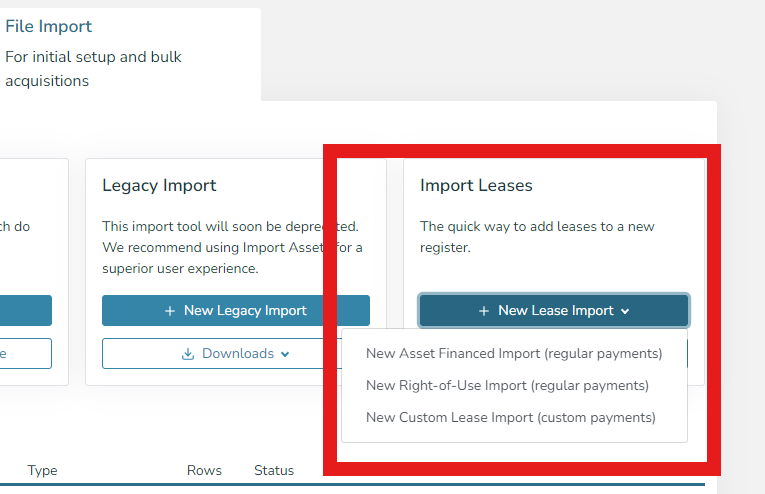
These should be used in the following scenarios:
1) Asset Financed Import (regular payments)
This uploader should be used for leases that are used to finance assets and have the following payment profile:
- 1 Initial Payment - Optional (e.g. a deposit)
- [X] Regular Payments (e.g. 24 monthly payments of the same amount or 5 annual payments of the same amount)
- 1 Final Payment - Options (e.g. a balloon payment)
For leases with irregular payment schedules, please see the Custom Lease Import below.
Note this should not be used for right-of-use assets.
2) Right-of-Use Import (regular payments)
This uploader should be used for right-of-use assets with the following payment profile:
- [X] Regular Payments (e.g. monthly rent on a building)
- The payments may be adjusted by a known rate each year (e.g. a 3% CPI uplift is built into the contract)
For leases with irregular payment schedules, please see the Custom Lease Import below.
Note this should not be used for leases used to purchase assets.
3) Custom Lease Import
This import should be used for all other leases and will require a tab in the data collection spreadsheet for each irregular lease.